forked from Archives/Athou_commafeed

194 lines
8.1 KiB
Markdown
194 lines
8.1 KiB
Markdown
# CommaFeed
|
|
|
|
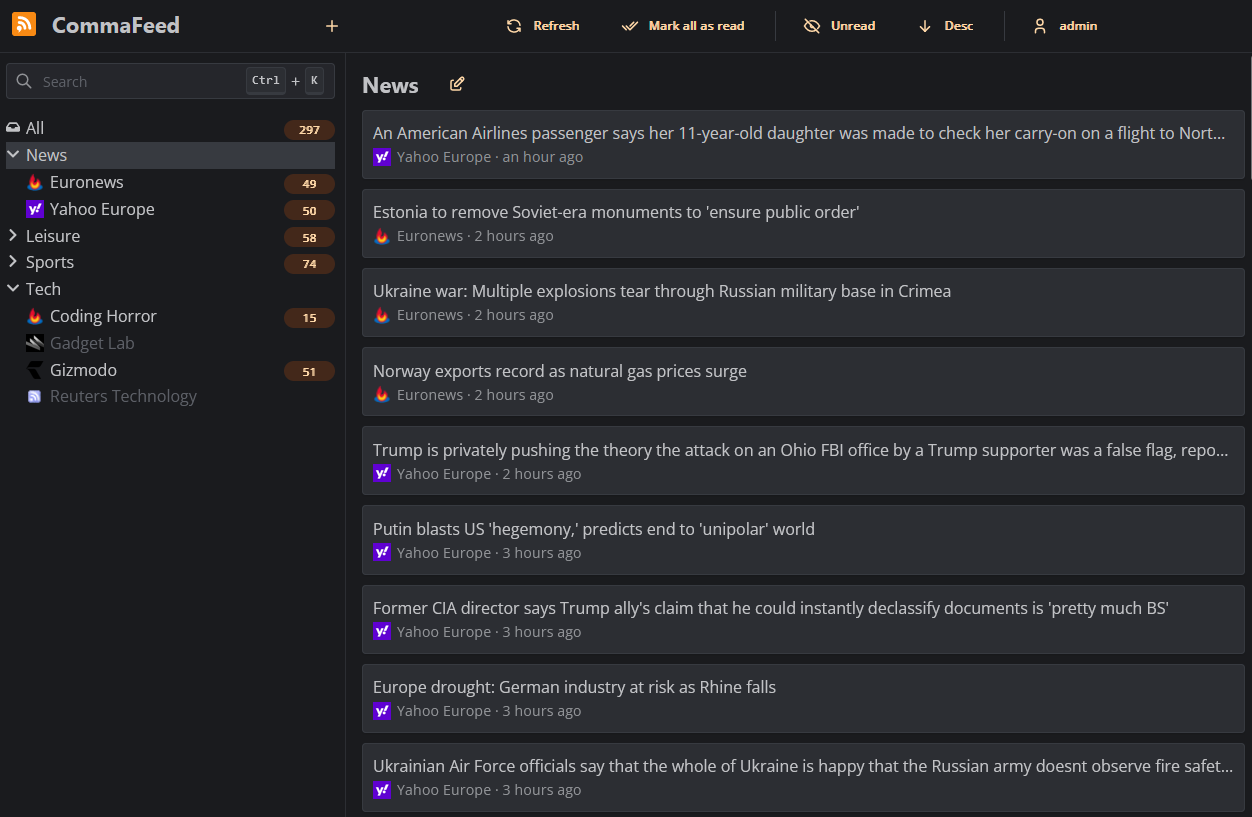
Google Reader inspired self-hosted RSS reader, based on Quarkus and React/TypeScript.
|
|
|
|
|
|
|
|
## Features
|
|
|
|
- 4 different layouts
|
|
- Light/Dark theme
|
|
- Fully responsive, works great on both mobile and desktop
|
|
- Keyboard shortcuts for almost everything
|
|
- Support for right-to-left feeds
|
|
- Translated in 25+ languages
|
|
- Supports thousands of users and millions of feeds
|
|
- OPML import/export
|
|
- REST API
|
|
- Fever-compatible API for native mobile apps
|
|
- Can automatically mark articles as read based on user-defined rules
|
|
- Push notifications when new articles are published
|
|
- Highly customizable with [custom CSS](https://athou.github.io/commafeed/documentation/custom-css) and JavaScript
|
|
- [Browser extension](https://github.com/Athou/commafeed-browser-extension)
|
|
- Compiles to native code for blazing fast startup and low memory usage
|
|
- Supports 4 databases
|
|
- H2 (embedded database)
|
|
- PostgreSQL
|
|
- MySQL
|
|
- MariaDB
|
|
|
|
## Usage
|
|
|
|
### Public instance
|
|
|
|
A free public instance is available at https://www.commafeed.com.
|
|
|
|
It has no ads, no tracking, and your data is never exploited or sold to third parties. The service is funded entirely through donations.
|
|
However, this public instance does have a few limitations compared to self-hosted setups, outlined [here](https://github.com/Athou/commafeed/discussions/1567).
|
|
|
|
### Docker
|
|
|
|
Docker is the easiest way to get started with self-hosted CommaFeed.
|
|
|
|
Docker images are built automatically and are available at https://hub.docker.com/r/athou/commafeed
|
|
|
|
### Cloud hosting
|
|
|
|
[PikaPods](https://www.pikapods.com) offers 1-click cloud hosting solutions starting at $1/month with a free $5
|
|
welcome credit and officially supports CommaFeed.
|
|
PikaPods shares 20% of the revenue back to CommaFeed.
|
|
|
|
[](https://www.pikapods.com/pods?run=commafeed)
|
|
|
|
### Download a precompiled package
|
|
|
|
Go to the [release page](https://github.com/Athou/commafeed/releases) and download the latest version for your operating
|
|
system and database of choice.
|
|
|
|
There are two types of packages:
|
|
|
|
- The `linux-x86_64`, `linux-aarch_64` and `windows-x86_64` packages are compiled natively and contain an executable that can be run
|
|
directly.
|
|
- The `jvm` package is a zip file containing all `.jar` files required to run the application. This package works on all
|
|
platforms but requires a JRE and is started with `java -jar quarkus-run.jar`.
|
|
|
|
If available for your operating system, the native package is recommended because it has a faster startup time and lower
|
|
memory usage.
|
|
|
|
### Build from sources
|
|
|
|
./mvnw clean package [-P<database> [-Pnative]] [-DskipTests]
|
|
|
|
- `<database>` can be one of `h2`, `postgresql`, `mysql` or `mariadb`. The default is `h2`.
|
|
- `-Pnative` compiles the application to native code. This requires GraalVM to be installed (`GRAALVM_HOME` environment
|
|
variable pointing to a GraalVM installation).
|
|
- `-DskipTests` to speed up the build process by skipping tests.
|
|
|
|
When the build is complete:
|
|
|
|
- a zip containing all jars required to run the application is located at
|
|
`commafeed-server/target/commafeed-<version>-<database>-jvm.zip`. Extract it and run the application with
|
|
`java -jar quarkus-run.jar`
|
|
- if you used the native profile, the executable is located at
|
|
`commafeed-server/target/commafeed-<version>-<database>-<platform>-<arch>-runner[.exe]`
|
|
|
|
### Distribution packages
|
|
|
|
- Arch Linux users can use [the CommaFeed package on AUR](https://aur.archlinux.org/pkgbase/commafeed), which builds native binaries with GraalVM for all supported databases.
|
|
|
|
## Configuration
|
|
|
|
CommaFeed doesn't require any configuration to run with its embedded database (H2). The database file will be stored in
|
|
the `data` directory of the current directory.
|
|
|
|
To use a different database, you will need to configure the following properties:
|
|
|
|
- `quarkus.datasource.jdbc.url`
|
|
- e.g. for H2: `jdbc:h2:./data/db;DEFRAG_ALWAYS=TRUE`
|
|
- e.g. for PostgreSQL: `jdbc:postgresql://localhost:5432/commafeed`
|
|
- e.g. for MySQL:
|
|
`jdbc:mysql://localhost/commafeed?autoReconnect=true&failOverReadOnly=false&maxReconnects=20&rewriteBatchedStatements=true&timezone=UTC`
|
|
- e.g. for MariaDB:
|
|
`jdbc:mariadb://localhost/commafeed?autoReconnect=true&failOverReadOnly=false&maxReconnects=20&rewriteBatchedStatements=true&timezone=UTC`
|
|
- `quarkus.datasource.username`
|
|
- `quarkus.datasource.password`
|
|
|
|
There are multiple ways to configure CommaFeed:
|
|
|
|
- a `config/application.properties` [properties](https://en.wikipedia.org/wiki/.properties) file relative to the working
|
|
directory (keys in kebab-case)
|
|
- Command line arguments each prefixed with `-D` (keys in kebab-case)
|
|
- Environment variables (keys in UPPER_CASE)
|
|
- a `.env` file in the working directory (keys in UPPER_CASE)
|
|
|
|
When in doubt, the properties file is recommended because CommaFeed will be able to warn about invalid properties and typos.
|
|
|
|
All [CommaFeed settings](https://athou.github.io/commafeed/documentation) are optional and have sensible default values.
|
|
|
|
When logging in, credentials are stored in an encrypted cookie. The encryption key is randomly generated at startup,
|
|
meaning that you will have to log back in after each restart of the application. To prevent this, you can set the
|
|
`quarkus.http.auth.session.encryption-key` property to a fixed value (min. 16 characters).
|
|
All other Quarkus settings can be found [here](https://quarkus.io/guides/all-config).
|
|
|
|
When started, the server will listen on http://localhost:8082.
|
|
|
|
### Updates
|
|
|
|
When CommaFeed is up and running, you can subscribe to [this feed](https://github.com/Athou/commafeed/releases.atom) to be notified of new releases.
|
|
|
|
### Memory management
|
|
|
|
The Java Virtual Machine (JVM) is rather greedy by default and will not release unused memory to the
|
|
operating system. This is because acquiring memory from the operating system is a relatively expensive operation.
|
|
This can be problematic on systems with limited memory.
|
|
|
|
#### Hard limit (`native` and `jvm` packages)
|
|
|
|
The JVM can be configured to use a maximum amount of memory with the `-Xmx` parameter.
|
|
For example, to limit the JVM to 256MB of memory, use `-Xmx256m`.
|
|
|
|
#### Dynamic sizing (`jvm` package)
|
|
|
|
In addition to the previous setting, the JVM can be configured to release unused memory to the operating system with the
|
|
following parameters:
|
|
|
|
-Xms20m -XX:+UseG1GC -XX:+UseStringDeduplication -XX:-ShrinkHeapInSteps -XX:G1PeriodicGCInterval=10000 -XX:-G1PeriodicGCInvokesConcurrent -XX:MinHeapFreeRatio=5 -XX:MaxHeapFreeRatio=10
|
|
|
|
See [here](https://docs.oracle.com/en/java/javase/17/gctuning/garbage-first-g1-garbage-collector1.html)
|
|
and [here](https://docs.oracle.com/en/java/javase/17/gctuning/factors-affecting-garbage-collection-performance.html) for
|
|
more
|
|
information.
|
|
|
|
#### OpenJ9 (`jvm` package)
|
|
|
|
The [OpenJ9](https://eclipse.dev/openj9/) JVM is a more memory-efficient alternative to the HotSpot JVM, at the cost of
|
|
slightly slower throughput.
|
|
|
|
IBM provides precompiled binaries for OpenJ9
|
|
named [Semeru](https://developer.ibm.com/languages/java/semeru-runtimes/downloads/).
|
|
This is the JVM used in
|
|
the [Docker image](https://github.com/Athou/commafeed/blob/master/commafeed-server/src/main/docker/Dockerfile.jvm).
|
|
|
|
## Translation
|
|
|
|
Files for internationalization are
|
|
located [here](https://github.com/Athou/commafeed/tree/master/commafeed-client/src/locales).
|
|
|
|
To add a new language:
|
|
|
|
- add the new locale to the `locales` array in:
|
|
- `commafeed-client/.linguirc`
|
|
- `commafeed-client/src/i18n.ts`
|
|
- run `npm run i18n:extract`
|
|
- add translations to the newly created `commafeed-client/src/locales/[locale]/messages.po` file
|
|
|
|
The name of the locale should be the
|
|
two-letters [ISO-639-1 language code](http://en.wikipedia.org/wiki/List_of_ISO_639-1_codes).
|
|
|
|
## Local development
|
|
|
|
### Backend
|
|
|
|
- Open `commafeed-server` in your preferred Java IDE.
|
|
- CommaFeed uses Lombok, you need the Lombok plugin for your IDE.
|
|
- run `./mvnw quarkus:dev`
|
|
|
|
### Frontend
|
|
|
|
- Open `commafeed-client` in your preferred JavaScript IDE.
|
|
- run `npm install`
|
|
- run `npm run dev`
|
|
|
|
The frontend server is now running at http://localhost:8082 and is proxying REST requests to the backend running on
|
|
port 8083
|