2022-10-25 13:40:39 +02:00
|
|
|
# CommaFeed
|
2014-12-05 08:22:00 +01:00
|
|
|
|
2023-04-25 15:34:20 +02:00
|
|
|
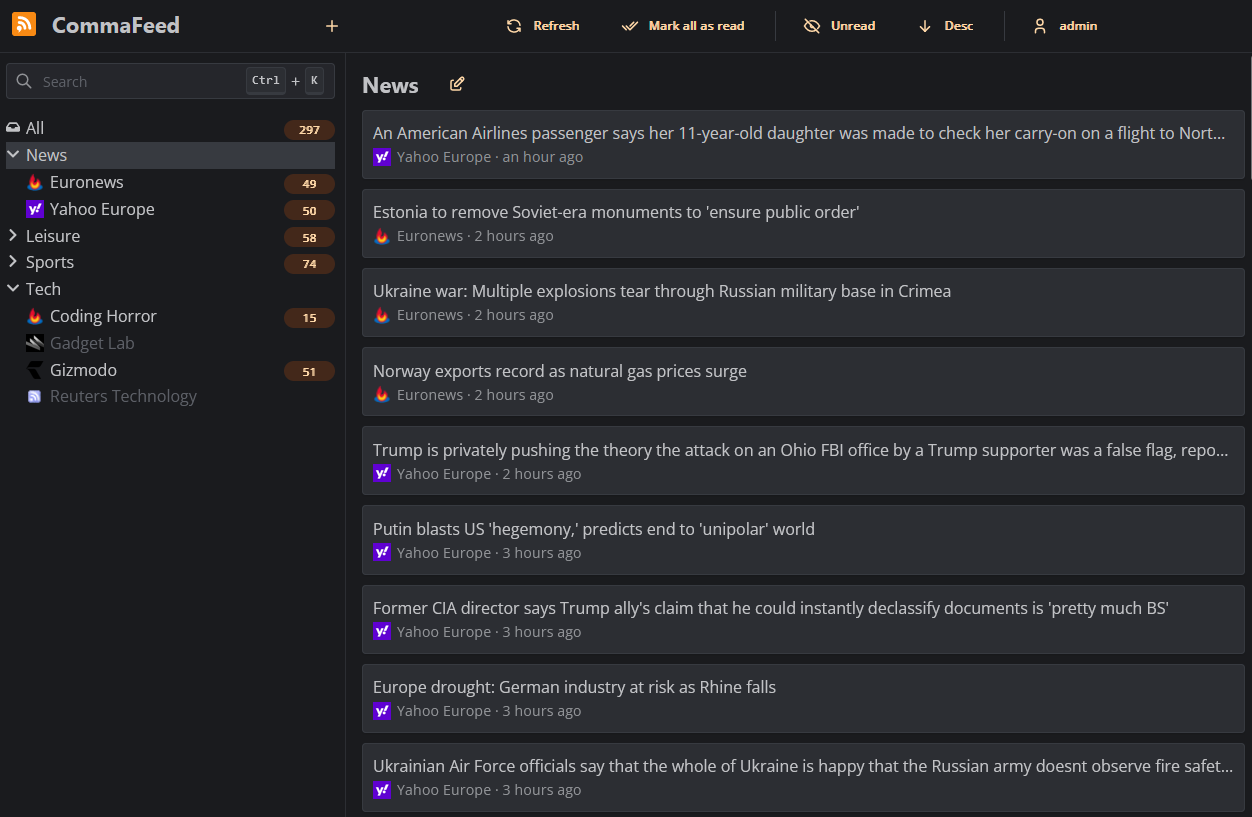
Google Reader inspired self-hosted RSS reader, based on Dropwizard and React/TypeScript.
|
2014-10-27 04:44:21 -04:00
|
|
|
|
2023-05-01 11:20:35 +02:00
|
|
|
|
|
|
|
|
|
|
|
|
|
## Features
|
|
|
|
|
|
|
|
|
|
- 4 different layouts
|
|
|
|
|
- Dark theme
|
|
|
|
|
- Fully responsive
|
|
|
|
|
- Keyboard shortcuts for almost everything
|
|
|
|
|
- Support for right-to-left feeds
|
|
|
|
|
- Translated in 25+ languages
|
|
|
|
|
- Supports thousands of users and millions of feeds
|
|
|
|
|
- OPML import/export
|
|
|
|
|
- REST API
|
|
|
|
|
|
2014-12-05 08:22:00 +01:00
|
|
|
## Related open-source projects
|
|
|
|
|
|
2022-10-25 13:40:39 +02:00
|
|
|
Browser extensions:
|
2014-10-27 04:44:21 -04:00
|
|
|
|
2022-10-25 13:40:39 +02:00
|
|
|
- [Chrome](https://github.com/Athou/commafeed-chrome)
|
|
|
|
|
- [Firefox](https://github.com/Athou/commafeed-firefox)
|
|
|
|
|
- [Opera](https://github.com/Athou/commafeed-opera)
|
|
|
|
|
- [Safari](https://github.com/Athou/commafeed-safari)
|
2014-10-27 04:44:21 -04:00
|
|
|
|
2014-12-05 08:22:00 +01:00
|
|
|
## Deployment on your own server
|
|
|
|
|
|
2023-04-25 08:57:55 +02:00
|
|
|
### Docker
|
|
|
|
|
|
|
|
|
|
Docker images are built automatically and are available at https://hub.docker.com/r/athou/commafeed
|
|
|
|
|
|
|
|
|
|
### Download precompiled package
|
2015-06-19 08:32:25 +02:00
|
|
|
|
|
|
|
|
mkdir commafeed && cd commafeed
|
2023-04-26 09:24:42 +02:00
|
|
|
wget https://github.com/Athou/commafeed/releases/download/3.0.1/commafeed.jar
|
|
|
|
|
wget https://raw.githubusercontent.com/Athou/commafeed/3.0.1/commafeed-server/config.yml.example -O config.yml
|
2015-06-19 08:32:25 +02:00
|
|
|
vi config.yml
|
2022-07-25 17:13:28 +02:00
|
|
|
java -Djava.net.preferIPv4Stack=true -jar commafeed.jar server config.yml
|
2015-06-19 08:32:25 +02:00
|
|
|
|
2023-04-25 08:57:55 +02:00
|
|
|
The server will listen on http://localhost:8082. The default
|
|
|
|
|
user is `admin` and the default password is `admin`.
|
|
|
|
|
|
|
|
|
|
### Build from sources
|
2014-12-05 08:22:00 +01:00
|
|
|
|
|
|
|
|
git clone https://github.com/Athou/commafeed.git
|
2015-06-26 14:13:14 +02:00
|
|
|
cd commafeed
|
2015-07-04 17:08:53 +02:00
|
|
|
./mvnw clean package
|
2022-10-25 13:40:39 +02:00
|
|
|
cp commafeed-server/config.yml.example config.yml
|
2015-06-26 14:13:14 +02:00
|
|
|
vi config.yml
|
2022-10-25 13:40:39 +02:00
|
|
|
java -Djava.net.preferIPv4Stack=true -jar commafeed-server/target/commafeed.jar server config.yml
|
2014-12-05 08:22:00 +01:00
|
|
|
|
2023-04-25 08:57:55 +02:00
|
|
|
The server will listen on http://localhost:8082. The default
|
|
|
|
|
user is `admin` and the default password is `admin`.
|
2014-10-27 04:44:21 -04:00
|
|
|
|
2023-04-25 08:57:55 +02:00
|
|
|
## Translation
|
2014-10-27 04:56:07 -04:00
|
|
|
|
2023-04-25 08:57:55 +02:00
|
|
|
Files for internationalization are
|
|
|
|
|
located [here](https://github.com/Athou/commafeed/tree/master/commafeed-client/src/locales).
|
2014-10-27 04:56:07 -04:00
|
|
|
|
2022-10-25 13:40:39 +02:00
|
|
|
To add a new language:
|
2014-10-27 04:56:07 -04:00
|
|
|
|
2022-10-28 10:24:33 +02:00
|
|
|
- edit `commafeed-client/src/i18n.ts`
|
2023-04-25 08:57:55 +02:00
|
|
|
- add the new locale to the `locales` array.
|
|
|
|
|
- import the dayjs locale
|
2022-10-25 13:40:39 +02:00
|
|
|
- edit `commafeed-client/.linguirc` and add the new locale to the `locales` array.
|
2022-10-28 10:24:33 +02:00
|
|
|
- run `npm run i18n` and add translations to the newly created `commafeed-client/src/locales/[locale]/messages.po` file
|
2014-10-27 04:56:07 -04:00
|
|
|
|
2023-04-25 08:57:55 +02:00
|
|
|
The name of the locale should be the
|
|
|
|
|
two-letters [ISO-639-1 language code](http://en.wikipedia.org/wiki/List_of_ISO_639-1_codes).
|
2014-10-27 04:56:07 -04:00
|
|
|
|
2022-10-25 13:40:39 +02:00
|
|
|
## Local development
|
2014-10-27 04:56:07 -04:00
|
|
|
|
2022-10-25 13:40:39 +02:00
|
|
|
### Backend
|
|
|
|
|
|
|
|
|
|
- Open `commafeed-server` in your preferred Java IDE.
|
2023-04-25 08:57:55 +02:00
|
|
|
- CommaFeed uses Lombok, you need the Lombok plugin for your IDE.
|
|
|
|
|
- If using Eclipse, Go to Window → Preferences → Maven → Annotation Processing and check "Automatically configure
|
|
|
|
|
JDT APT"
|
2022-10-25 13:40:39 +02:00
|
|
|
- Start `CommaFeedApplication.java` in debug mode with `server config.dev.yml` as arguments
|
|
|
|
|
|
|
|
|
|
### Frontend
|
2014-10-27 04:44:21 -04:00
|
|
|
|
2022-10-25 13:40:39 +02:00
|
|
|
- Open `commafeed-client` in your preferred JavaScript IDE.
|
|
|
|
|
- run `npm install`
|
|
|
|
|
- run `npm run dev`
|
2023-04-25 08:57:55 +02:00
|
|
|
- the frontend server is now running at http://localhost:8082 and is proxying REST requests to the backend running on
|
|
|
|
|
port 8083
|
2014-10-27 04:44:21 -04:00
|
|
|
|
2014-12-05 08:22:00 +01:00
|
|
|
## Copyright and license
|
2014-10-27 04:44:21 -04:00
|
|
|
|
2023-04-25 08:57:55 +02:00
|
|
|
Copyright 2013-2023 CommaFeed.
|
2014-10-27 04:44:21 -04:00
|
|
|
|
|
|
|
|
Licensed under the Apache License, Version 2.0 (the "License");
|
|
|
|
|
you may not use this work except in compliance with the License.
|
|
|
|
|
You may obtain a copy of the License in the LICENSE file, or at:
|
|
|
|
|
|
2022-07-25 17:13:28 +02:00
|
|
|
http://www.apache.org/licenses/LICENSE-2.0
|
2014-10-27 04:44:21 -04:00
|
|
|
|
|
|
|
|
Unless required by applicable law or agreed to in writing, software
|
|
|
|
|
distributed under the License is distributed on an "AS IS" BASIS,
|
|
|
|
|
WITHOUT WARRANTIES OR CONDITIONS OF ANY KIND, either express or implied.
|
|
|
|
|
See the License for the specific language governing permissions and
|
2014-09-15 11:34:44 -04:00
|
|
|
limitations under the License.
|


